Understand Writeback results and usage
Find final results, investigate failed rows, and understand successful-row counting.
Writebacks are processed asynchronously. The review submission and Amazon's final result are separate stages.
For submission and processing timing, see Understand Writeback timing.
Find the final result
After you submit, Hopted queues the reviewed changes for Amazon. Writebacks submitted successfully confirms that stage; it does not confirm that every row was accepted.
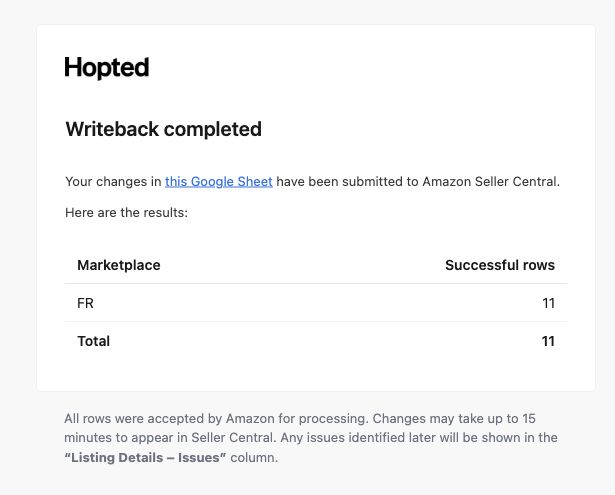
Hopted sends the submitting admin a confirmation email when processing finishes, so you can leave the spreadsheet while it runs. Look for Writeback to Amazon followed by the marketplace codes, such as FR or US.
The Writeback completed email links back to the Google Sheet and lists successful, partially successful and failed rows by marketplace, where applicable. Read the results before resubmitting: completion does not mean every change succeeded.
Inspect errors and warnings
- Add Last Writeback Issues to your sync if it is not already included.
- Locate the affected product row. Double-click its issues cell to expand the details when needed.
- Read the reported field, reason and marketplace. Correct the underlying value or Amazon requirement.
- Review and submit only the rows or cells that need another attempt.
This column reflects the last Writeback and is cleared when a new Writeback starts. Keep the relevant details before another submission if you need them for support.
Understand usage counts
Usage is based on product rows Amazon accepts successfully, rather than the number of edited cells. Several successful attribute changes in the same SKU row within one submission count as one successful row. Failed rows do not count. Submitting that row successfully again later counts again.
Open Settings → Usage for your current allowance and usage. Hopted checks access before submission and shows the next step if the batch needs more capacity.
If Amazon accepts the change but the public product page stays the same, see Troubleshoot Writeback results.