Amazon listing details connector
Amazon listing details connector
Feb 1, 2026
Every Amazon seller knows the drill: you upload perfect product data, but your live listing shows something completely different. Where did it go wrong? Good luck finding out.
Today, we are releasing support for Listing Details, giving you the ability to retrieve detailed information about your Amazon listings to see the values you are pushing for your Amazon product detail pages.
You can now see exactly what information you have in your listings at a glance, before Amazon's contribution algorithms decide what to display.
We launched with 70+ attributes based on what our early users needed most. Missing a field? Just ask—we can add it quickly.
Spot listing discrepancies
The most frustrating Amazon problems come from invisible data mismatches. Now you can actually see them.
See broken variations
See why a child ASIN became “parentless” by checking whether the Parent SKU and Variation Theme values are actually set —not just what you think you submitted.Internationalization
Verify Country of Origin, Region, and localized content before your EU marketplace submissions get rejected for hidden translation errors.Ensure creatives are in place
Verify the core content and visuals: Title, Bullets, Description, Keywords, Brand, Images and more.Catch compliance traps
Audit niche fields like GPSR Safety Attestation or EU Toys Safety Directive before Amazon suppresses your listing without warning.
Getting started
Open the Hopted sidebar in your Google Sheet
Click + Add new data sync
Select your Amazon Seller Central account to proceed to column selection.
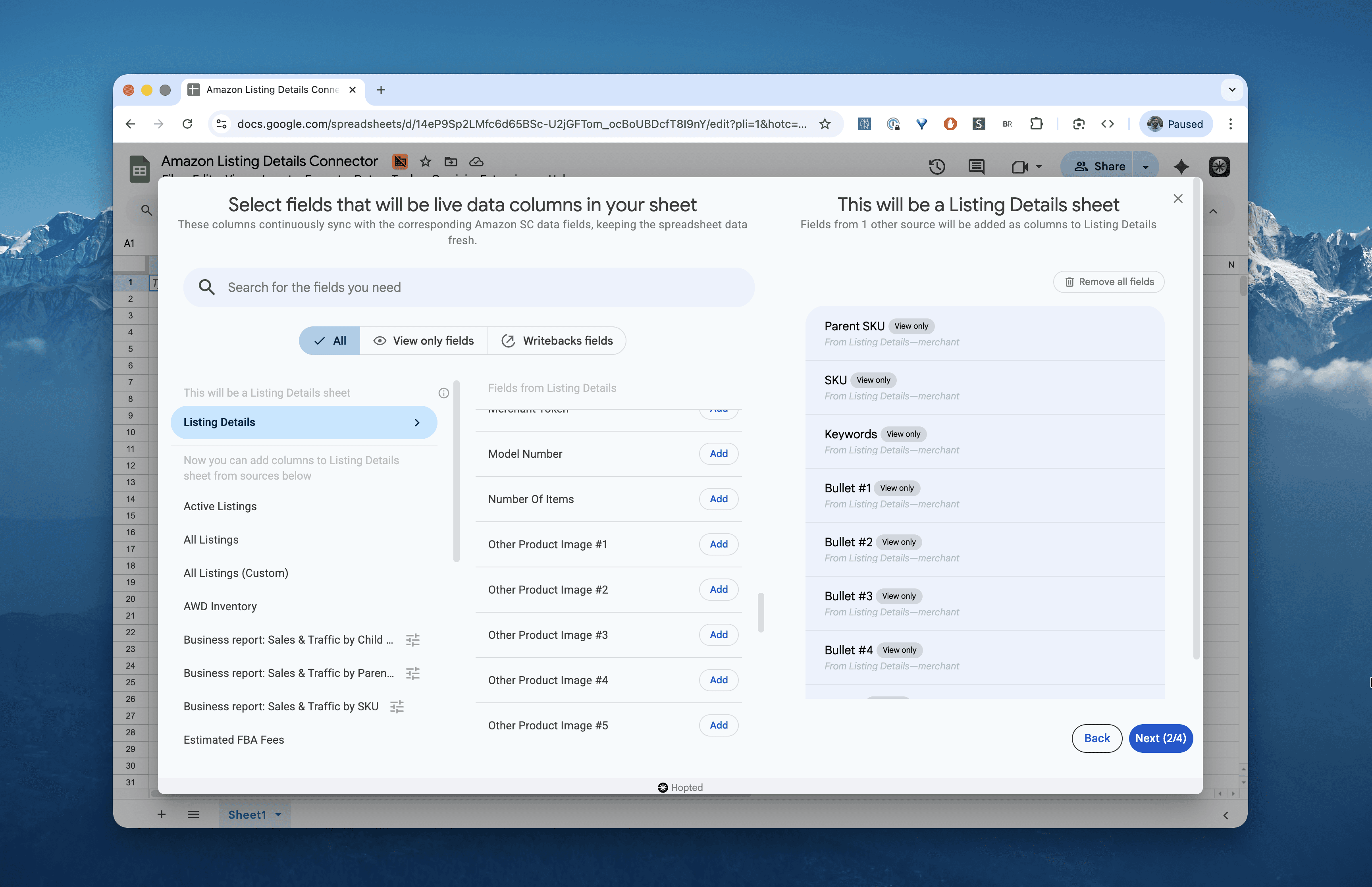
On the left, under Sources, select Listing Details and choose the columns you want to inspect (e.g., SKU, Bullets, Brand, Keywords, Is Adult Product).
Set a schedule for how often Hopted should refresh your data and save the Sync.
What's next: end-to-end management
This release is just step one. Seeing your data is crucial, but being able to act on it is the goal.
In the coming weeks, we’re releasing Listing Edits (part of our Writeback feature). This unlocks bulk listing edits and lets you update multiple marketplaces and accounts from a single Google Sheet — pushing changes directly to Amazon.
The magical part is that Hopted updates only the listing fields you actually want to change — and nothing else. No more tedious clicking in Amazon Seller Central to make the same change across hundreds of listings or error-prone process of filling out bulky Excel templates (that can accidentally break things) just to, for example, change a parent ASIN.
We are particularly proud that our early preview users achieved a 100% submission success rate, proving that bulk edits can finally be safe and straightforward.
Every Amazon seller knows the drill: you upload perfect product data, but your live listing shows something completely different. Where did it go wrong? Good luck finding out.
Today, we are releasing support for Listing Details, giving you the ability to retrieve detailed information about your Amazon listings to see the values you are pushing for your Amazon product detail pages.
You can now see exactly what information you have in your listings at a glance, before Amazon's contribution algorithms decide what to display.
We launched with 70+ attributes based on what our early users needed most. Missing a field? Just ask—we can add it quickly.
Spot listing discrepancies
The most frustrating Amazon problems come from invisible data mismatches. Now you can actually see them.
See broken variations
See why a child ASIN became “parentless” by checking whether the Parent SKU and Variation Theme values are actually set —not just what you think you submitted.Internationalization
Verify Country of Origin, Region, and localized content before your EU marketplace submissions get rejected for hidden translation errors.Ensure creatives are in place
Verify the core content and visuals: Title, Bullets, Description, Keywords, Brand, Images and more.Catch compliance traps
Audit niche fields like GPSR Safety Attestation or EU Toys Safety Directive before Amazon suppresses your listing without warning.
Getting started
Open the Hopted sidebar in your Google Sheet
Click + Add new data sync
Select your Amazon Seller Central account to proceed to column selection.
On the left, under Sources, select Listing Details and choose the columns you want to inspect (e.g., SKU, Bullets, Brand, Keywords, Is Adult Product).
Set a schedule for how often Hopted should refresh your data and save the Sync.
What's next: end-to-end management
This release is just step one. Seeing your data is crucial, but being able to act on it is the goal.
In the coming weeks, we’re releasing Listing Edits (part of our Writeback feature). This unlocks bulk listing edits and lets you update multiple marketplaces and accounts from a single Google Sheet — pushing changes directly to Amazon.
The magical part is that Hopted updates only the listing fields you actually want to change — and nothing else. No more tedious clicking in Amazon Seller Central to make the same change across hundreds of listings or error-prone process of filling out bulky Excel templates (that can accidentally break things) just to, for example, change a parent ASIN.
We are particularly proud that our early preview users achieved a 100% submission success rate, proving that bulk edits can finally be safe and straightforward.