Warum Ihre Angebotsänderungen nicht immer auf der Amazon-Produktseite erscheinen


Amazon-Händler verwenden die Begriffe Listing, ASIN, Katalogartikel und Produktseite häufig wie Synonyme. Im Gespräch ist das meist unproblematisch. Technisch bezeichnen sie jedoch unterschiedliche Dinge.
Der Unterschied ist wichtig, weil die Bearbeitung eines Listings zwei verschiedene Bereiche betreffen kann:
nur die eigene SKU beziehungsweise das Angebot dieses Verkäufers oder
die gemeinsame Amazon-Produktseite der ASIN.
Der Kern ist einfach:
Ein Listing ist verkäuferspezifisch. Eine ASIN identifiziert einen gemeinsamen Katalogartikel. Manche Listing-Änderungen können als Beiträge in dessen Produktseite einfließen.
Vier Begriffe, die leicht verwechselt werden
Ein Amazon Catalog Item ist der Produktdatensatz im Amazon-Katalog.
Die ASIN ist Amazons eindeutige Kennung dieses Katalogartikels.
Ein Amazon Listing ist ein verkäuferspezifischer Datensatz, der die SKU eines Verkäufers mit einem Produkt im Amazon-Katalog verbindet.
Das Angebot beziehungsweise „Offer“ ist der kaufmännische Teil des Listings: Preis, Menge, Zustand, Versandart und Versanddetails.
Vereinfacht lässt sich das so zusammenfassen:
Begriff |
Bedeutung |
|---|---|
ASIN / Katalogartikel |
Das gemeinsam genutzte Produkt im Amazon-Katalog |
Listing / SKU |
Der verkäuferspezifische Datensatz zum Verkauf dieses Produkts |
Angebot / Offer |
Die Verkaufskonditionen des jeweiligen Verkäufers |
Katalogartikel und Listing
Ein Amazon Catalog Item beschreibt das Produkt aus Sicht des Amazon-Katalogs.
Es kann Angaben wie Titel, Marke, Bilder, Aufzählungspunkte, Beschreibung, Produkttyp, Größe, Farbe, Material, Variantenbeziehungen und externe Produktkennungen enthalten.
Der Katalogartikel wird von allen Verkäufern gemeinsam genutzt. Er gehört keinem einzelnen Verkäufer.
Ein Verkäufer-Listing ist die individuelle Verbindung eines Verkäufers zu diesem Katalogartikel.
Es enthält verkäuferspezifische Angaben wie Preis, Menge, Zustand, Versandkonfiguration und weitere Angebotskonditionen.
Das Listing kann aber auch Produktdaten enthalten: Titel, Bilder, Marke, Größe, Farbe, Kennungen, Variantenangaben und weitere Attribute.
Hier wird die Wortwahl etwas verwickelt, passiert schnell mal
Wenn ein Verkäufer sagt „Ich habe das Listing geändert“, kann er damit zwei Dinge meinen:
„Ich habe meine eigenen Angebotskonditionen geändert.“
„Ich habe Produktdaten geändert, die als Beitrag zur gemeinsamen ASIN dienen können.“
Diese beiden Änderungsarten verhalten sich unterschiedlich und können bei Amazon zu unterschiedlichen Ergebnissen führen.
Zwei Arten von Listing-Änderungen
Verkäuferspezifische Änderungen
Diese betreffen in der Regel nur das eigene Listing beziehungsweise Angebot des Verkäufers.
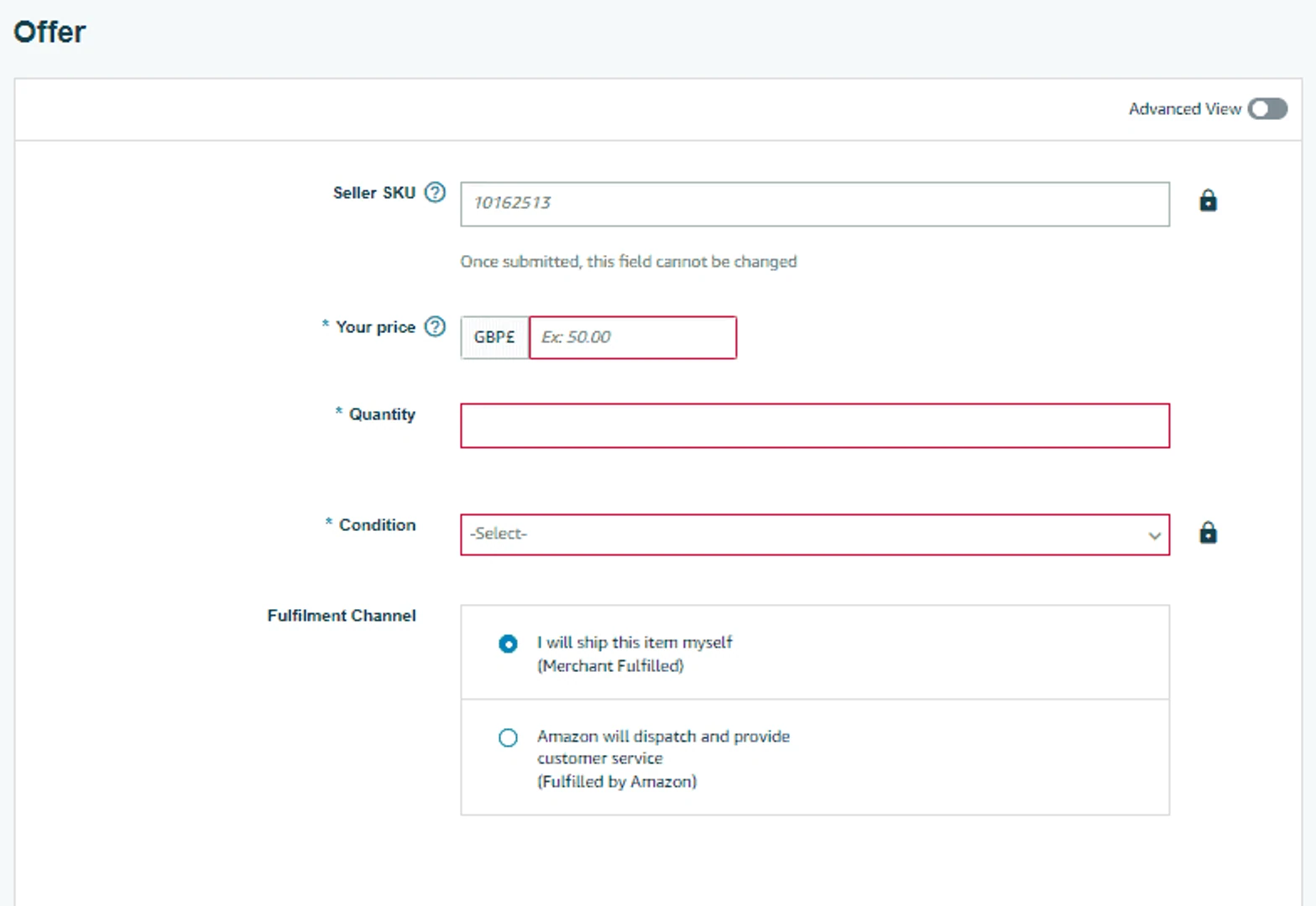
Dazu gehören Preis, Menge, Zustand, Versandart, Bearbeitungszeit und Versandeinstellungen.
Wenn Sie Preis, Menge oder Versandart ändern, passen Sie Ihre eigenen Konditionen für den Verkauf dieser ASIN an.
Änderungen an Produktdaten
Produktdaten beschreiben den Artikel selbst.
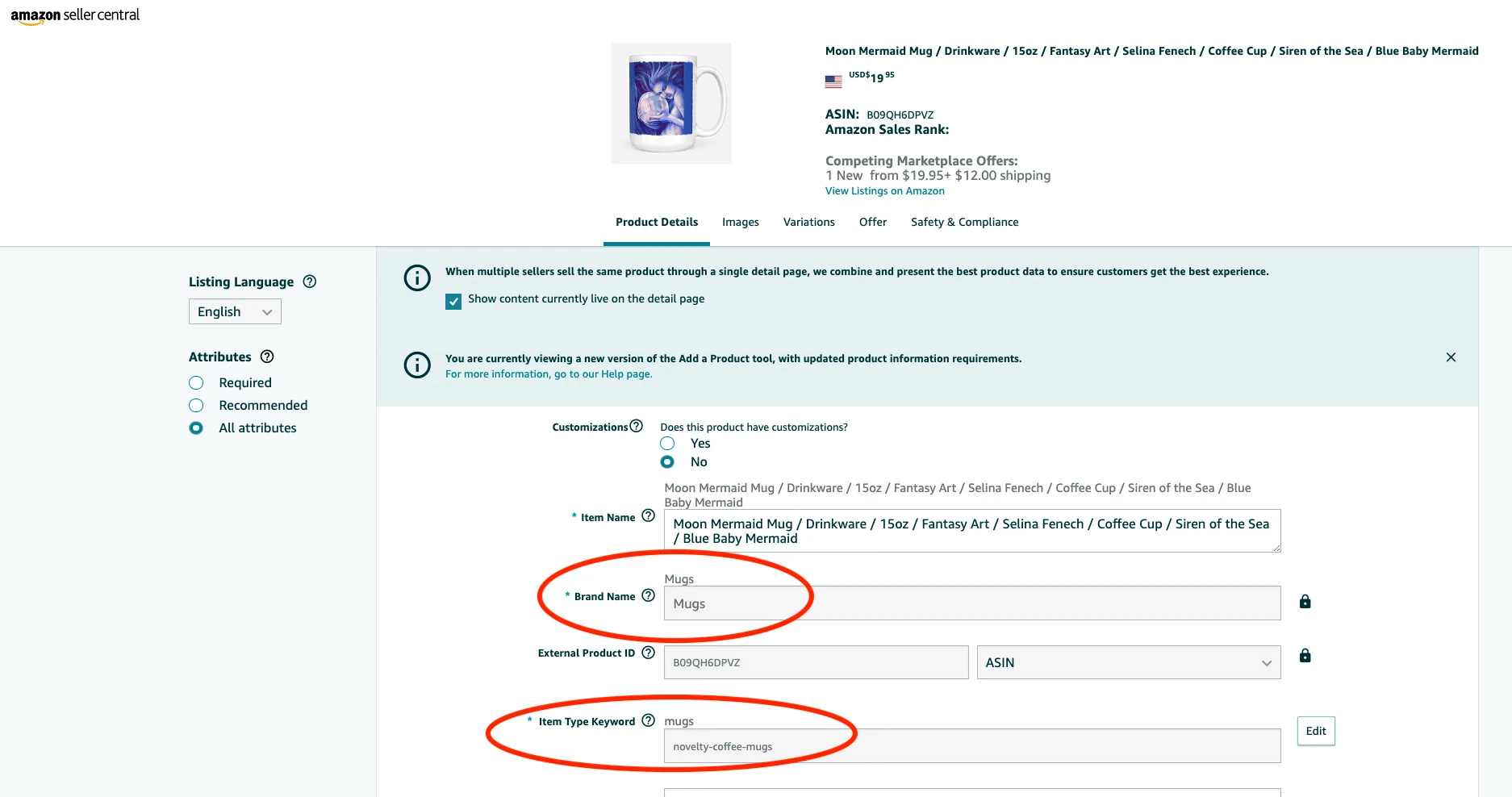
Dazu gehören Titel, Marke, Bilder, Aufzählungspunkte, Beschreibung, Größe, Farbe, Material, Produktkennungen, Variantenangaben und Artikelmaße.
Einige Produktattribute lassen sich korrigieren, andere sind eingeschränkt. Eine bestehende ASIN darf nicht für ein wesentlich anderes Produkt umgewidmet werden. Auch eine zulässige Änderung bleibt ein Beitrag und verspricht keine sichtbare Änderung der Seite.
Der entscheidende Unterschied:
Geänderte Angebotskonditionen betreffen normalerweise nur Ihr Verkäufer-Listing. Geänderte Produktdaten können die gemeinsame ASIN-Seite verändern.
Drei mögliche Ergebnisse einer Listing-Änderung
Ergebnis 1: Nur Ihr Angebot ändert sich
Das passiert, wenn der Verkäufer seine eigenen Angebotsdaten bearbeitet.
Typische Beispiele:
Preisänderung
Mengenänderung
Änderung des Zustands
Wechsel der Versandart
Änderung von Versand- oder Bearbeitungszeit
Das Ergebnis:
Ihr Angebot ändert sich;
der gemeinsame Titel, die Bilder und die Beschreibung bleiben unverändert;
die Angebotsdatensätze anderer Verkäufer bleiben unverändert, der Wettbewerb um das hervorgehobene Angebot kann sich jedoch ändern.
Das ist der einfachste Fall.
Ergebnis 2: Die ASIN-Produktdetailseite ändert sich
Das kann passieren, wenn ein Verkäufer Produktdaten bearbeitet.
Typische Beispiele:
Änderung eines Aufzählungspunkts
Änderung eines Bildes
Korrektur des Titels
Änderung der Beschreibung
Korrektur von Größe oder Material
Korrektur von Variantenangaben
Wenn Amazon den Beitrag des Verkäufers akzeptiert und für die Darstellung auswählt, kann sich die sichtbare Produktseite ändern.
Dabei entsteht keine neue ASIN. Die Kennung bleibt gleich. Geändert werden die Produktdaten, die zu dieser ASIN angezeigt werden.
Ergebnis 3: Ihr Beitrag wird gespeichert, aber nicht angezeigt
Das ist für Verkäufer besonders verwirrend. Bei Hopted erhalten wir hierzu die meisten Fragen rund um Writebacks, also die Massenbearbeitung von Amazon-Listings.
Nach einer Änderung über Writebacks oder Seller Central kann die öffentliche Seite weiterhin alte Inhalte zeigen. Prüfen Sie zuerst das Verarbeitungsergebnis und mögliche Listing-Probleme: Die anfängliche Annahme bestätigt nicht, dass jedes Attribut übernommen wurde.
Das liegt daran, dass Amazons Katalog Produktinformationen aus mehreren Quellen erhalten kann:
dem Markeninhaber;
anderen Verkäufern;
Amazon Retail;
Vendoren;
Herstellerdaten;
früheren Katalogbeiträgen;
Amazons eigenen Katalogregeln.
Amazon entscheidet anschließend, welcher Beitrag auf der Produktdetailseite angezeigt wird.
Ihr Wert kann also als Verkäuferbeitrag gespeichert sein, ohne zum sichtbaren Wert auf der ASIN-Seite zu werden.
Ihr Listing kann aktualisiert sein, obwohl Ihr Beitrag für die gemeinsame ASIN-Detailseite nicht ausgewählt wurde.
Deshalb wirkt es manchmal, als hätte Amazon eine Änderung ignoriert. Häufig ist sie gespeichert, doch Amazon bevorzugt für die Anzeige einen anderen Beitrag.
Wer bestimmt die Produktinhalte?
Nicht jeder Verkäufer hat denselben Einfluss auf die Inhalte einer ASIN-Seite.
Ein Beitrag zur Produktdetailseite ist ein vorgeschlagener Wert für ein bestimmtes Katalogattribut, etwa Titel, Bild, Marke oder Größe.
Amazon validiert die Einreichung und verarbeitet sie anschließend weiter. Die Dokumentation zum Listing-Ablauf unterscheidet zwischen anfänglicher Annahme, späteren Problemen und dem aktuellen Listing-Status. Die Auswahl für den Katalog ist ein weiterer Schritt.
Bei Produkten registrierter Marken haben Markeninhaber und der Marke zugeordnete Verkäufer in der Regel stärkeren Einfluss auf Produktinhalte. Wer der Marke nicht zugeordnet ist, kann eingeschränkte Änderungsmöglichkeiten haben. Bei widersprüchlichen Beiträgen vergleichbar berechtigter Verkäufer kann Amazon weitere Signale wie Verkaufsvolumen, Erstattungsquote, Käuferfeedback und A-bis-z-Garantieanträge berücksichtigen.
Auch Beiträge von Amazon Retail, Vendoren, Herstellern oder bereits vorhandene Katalogdaten können Vorrang haben. Amazon veröffentlicht nicht die vollständige Gewichtung dieser Faktoren.
Daraus ergeben sich drei Zustände: Der Beitrag wird abgelehnt, akzeptiert, aber nicht angezeigt, oder für die Produktseite ausgewählt. Mit der Einreichung bitten Sie Amazon, einen Wert zu berücksichtigen. Sie ersetzen damit nicht unmittelbar den Wert, den Kunden sehen.
Rolle |
Einflussbereich |
|---|---|
Verkäufer |
Eigenes Listing und eigene Angebotsdaten auf SKU-Ebene |
Markeninhaber |
Kann bei Produkten einer registrierten Marke stärkeren Einfluss auf die Inhalte haben |
Amazon |
Gemeinsamer Katalogartikel und die letztlich angezeigten ASIN-Inhalte |
Selbst wenn ein Verkäufer die Produktseite ursprünglich angelegt hat, kann Amazon bei der Anzeige dem Markeninhaber, anderen vertrauenswürdigen Beiträgen oder eigenen Katalogregeln Vorrang geben.
Brand Registry bedeutet außerdem nicht automatisch, dass niemand sonst das Produkt verkaufen darf. Einfluss auf Inhalte und Verkaufsberechtigung sind unterschiedliche Fragen:
Stärkerer Einfluss auf Produktinhalte bedeutet nicht automatisch ein exklusives Verkaufsrecht.
Ein Markeninhaber kann stärkeren Einfluss auf die Detailseite haben, während andere berechtigte Verkäufer weiterhin Angebote für dieselbe ASIN erstellen können.
Viele Listings kontrolliert aktualisieren
Wer viele SKUs verwaltet, muss nicht nur wissen, welche Felder die ASIN-Seite beeinflussen können. Änderungen müssen auch kontrolliert ablaufen: vorher prüfen, manuelle Fehler vermeiden und dokumentieren, was gesendet wurde.
Dabei kann ein Arbeitsablauf in Tabellen helfen.
Mit Hopted bearbeiten Verkäufer Amazon-Listingdaten gesammelt direkt in Google Sheets und senden ausgewählte, geprüfte Änderungen über Writebacks an Amazon.
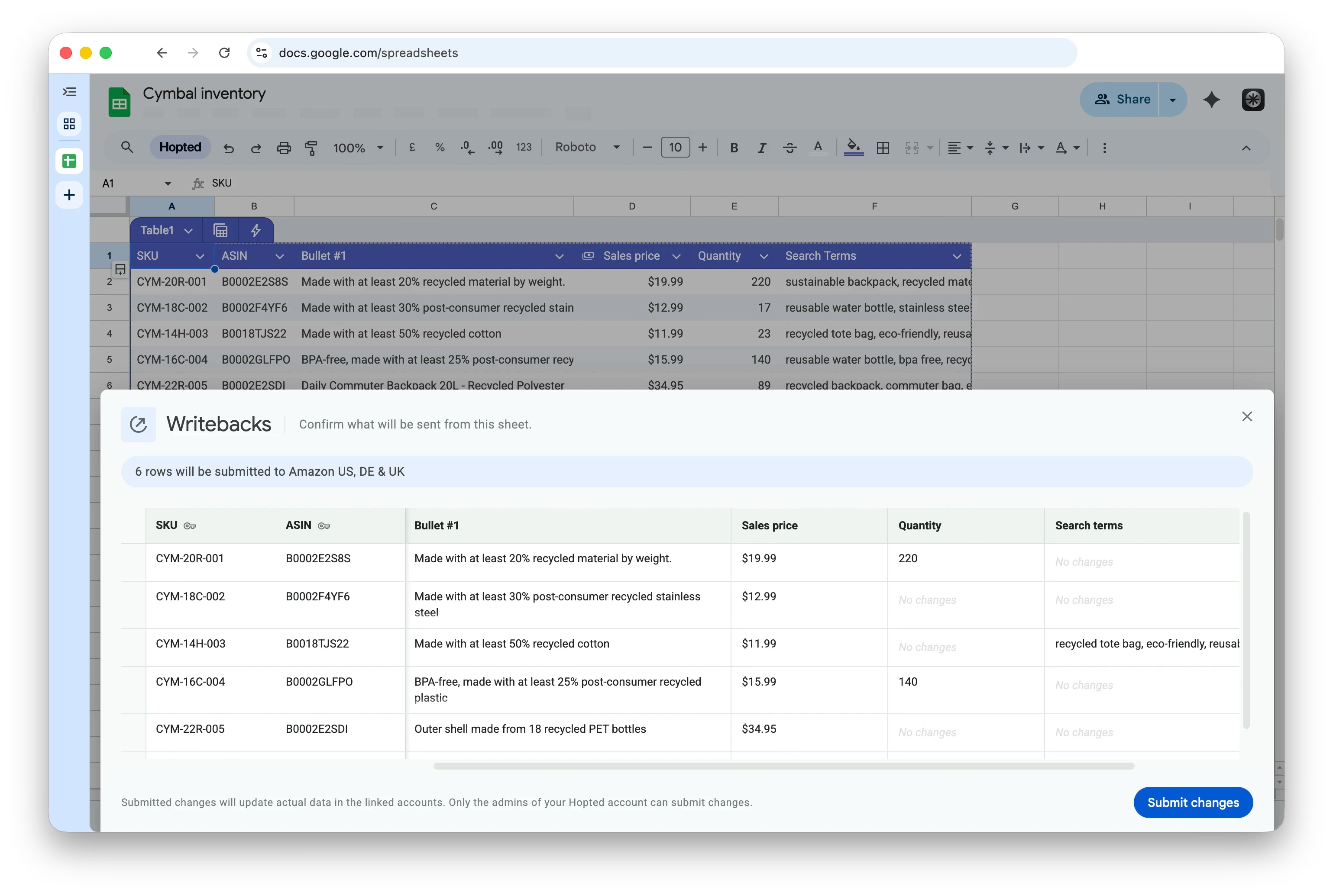
Hopted verändert Amazons Katalogregeln nicht. Amazon entscheidet weiterhin, ob Produktänderungen angenommen und auf der gemeinsamen ASIN-Seite angezeigt werden. Hopted macht jedoch den Weg zur Einreichung schneller, kontrollierter und übersichtlicher. Zähe Einzelbearbeitungen in Seller Central und aufwendige Flatfile-Dateien entfallen.
Die entscheidenden Zusammenhänge
Eine ASIN identifiziert das gemeinsame Produkt im Amazon-Katalog.
Ein Listing ist der verkäuferspezifische SKU-Datensatz, der mit diesem Produkt verbunden ist.
Das Angebot beziehungsweise „Offer“ enthält die kaufmännischen Konditionen des Listings.
Änderungen an Preis, Menge, Zustand oder Versandkonfiguration betreffen in der Regel nur das eigene Verkäufer-Listing.
Änderungen an Produktdaten wie Titel, Bildern, Aufzählungspunkten, Marke, Größe, Farbe, Varianten oder Produktkennungen können als Beiträge zur gemeinsamen ASIN-Detailseite eingereicht werden.
Bei Produkten registrierter Marken haben Markeninhaber und zugeordnete Verkäufer in der Regel stärkeren Einfluss auf die Produktinhalte.
Ein Listing angelegt zu haben oder zu verwalten, verleiht keine dauerhafte Kontrolle über die ASIN. Sie ist Teil des gemeinsamen Amazon-Katalogs. Amazon entscheidet, welche Produktdaten auf der Detailseite erscheinen.
